Controls, Compared · 2026
Touch-Panel Bidet Seats vs Physical Side-Panel Buttons: Which Wears Better?
By Ilane TallUpdated October 16, 2026Research-based
Best Bidet Seats is reader-supported. When you buy through our links we may earn a commission, at no additional cost to you. Commissions never change which products we recommend.
Every bidet seat listing photo looks the same way at 2 a.m. on your phone: a spotless white seat, a crisp control surface lit from inside, maybe a finger hovering a half-inch above the glass to suggest effortless control. What that photo can't show you is how that surface behaves after three months next to a toilet in a room that gets humid, gets splashed, and gets used by hands that aren't always dry. That's the gap this guide is about — not which seat has more wash modes, but what the control surface itself is actually like to live with.
There are really only two mechanical choices here. A capacitive touch panel is a sealed, flush sheet of glass or plastic with printed icons underneath, the same basic technology as a microwave's touch controls. A physical side panel is a row of individual raised or recessed buttons, usually backlit, each one a discrete mechanical switch. Everything else — remote control, LED display, night light — sits on top of that base choice and doesn't change it. We compared the published specs, the listing photography, and the pattern of complaints that shows up across verified owner reviews for seats of each type, to work out what the control surface changes in practice and which one actually holds up.
One honest note before anything else: we don't run a fake testing lab and we're not going to pretend we installed three bidet seats in a bathroom for a season to find out. Everything below comes from manufacturer specifications, the photography and wording in the actual listings, and what owners report once a seat has been living in a real bathroom for a while — including the critical reviews, which is where a control panel's real behavior shows up.
What you're actually touching
The two control surfaces, mechanically
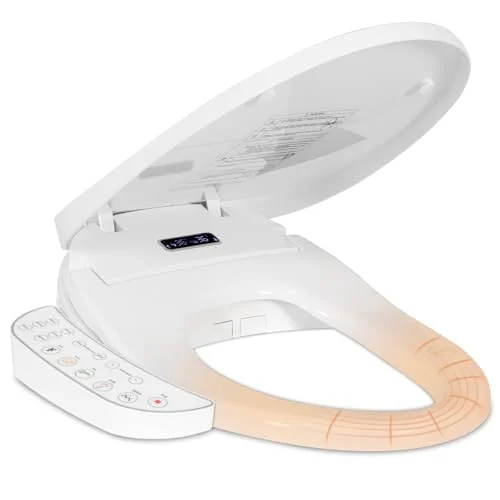
A touch panel on a bidet seat is almost always capacitive, not pressure-sensitive — it reads the small electrical change your skin creates when it contacts the surface, the same principle as a smartphone screen. Underneath a sealed sheet of glass or hard plastic sits a thin conductive grid and a backlight that illuminates printed icons for wash, stop, dryer, and the rest. Because the surface is one continuous piece with no seams, no springs, and nothing to depress, manufacturers like it: it's cheap to seal against moisture and it photographs beautifully, which is exactly why it shows up on the glossy "touch panel" listings like the KioGro seat, whose side panel doubles as an LED display for water temperature and seat settings.
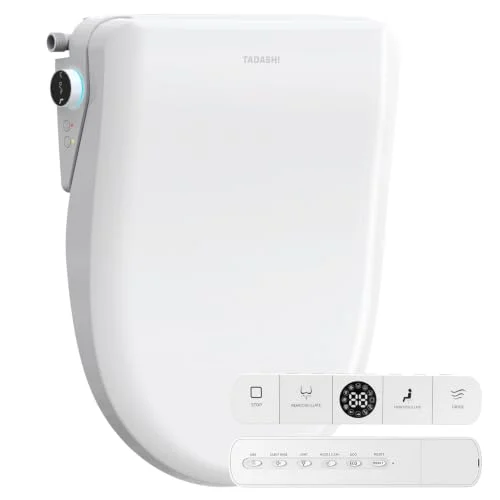
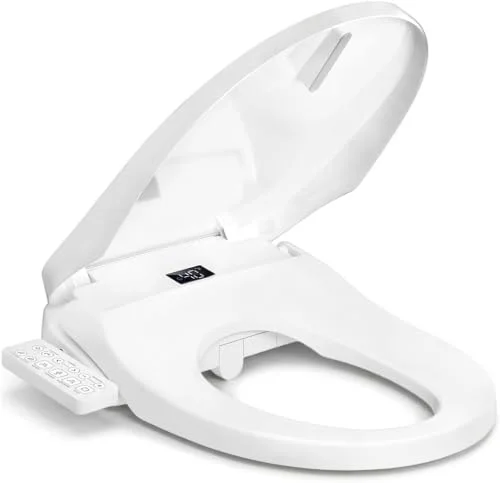
A physical side panel is a cluster of individual mechanical buttons, each with its own switch underneath, usually with a backlight behind the icon so you can find the right button in a dark room. Press one and you feel it travel a millimeter or two and click — that's a real mechanical event, not an inference the panel makes about your fingertip. The Tadashi seat's side panel is a good example of the layout: individual labeled buttons for wash, pressure, and seat functions, backed up by a separate wireless remote for the same controls. The unbranded Side Control model sold under ASIN B0HBBF9K6K uses the same mechanical approach without the remote — buttons built directly into the seat's side panel and nothing else.
What the listing photo never shows
Smudges, water spots, and glare on a glass panel
The studio photo of a touch-panel bidet seat is taken on a brand-new unit, under even lighting, with no hands anywhere near it. That's the version you're shopping from. The version that ends up in your bathroom sits at hip height next to a toilet, gets reached for with hands that have just washed or just finished using the seat, and lives under whatever light fixture happens to be overhead — often a single bulb at a steep angle that turns any glossy surface into a glare panel.
A flush glass or hard-plastic touch surface shows every one of those interactions. Fingerprints sit visibly on glass in a way they don't on a textured plastic button. Water droplets from a nearby faucet, a shower a few feet away, or simply condensation in a humid bathroom bead up and smear when wiped with a towel rather than a microfiber cloth. None of this breaks the panel — capacitive touch is sealed and designed to handle incidental moisture — but it does mean a touch-panel bidet seat needs an actual wipe-down more often than a photo ever suggests, and the backlit icons underneath the glass can make existing smudges more visible, not less, once the display or LED lights up behind them.
Physical buttons have their own version of this problem but it reads differently. The recessed gaps around each button collect dust and, eventually, a faint ring of residue, but because the surface isn't one continuous reflective sheet, raking light doesn't turn the whole panel into a glare source the way it does with glass. The trade is: a touch panel is easier to wipe clean in one swipe but shows the need to do so more obviously; a button panel hides grime longer in its seams but takes a little more care — a toothbrush or a cotton swab along the edges — to actually get clean.
The daily-use test
Tactile feedback, and working with wet or soapy hands
This is where the two control types diverge the most in actual daily use, and it has nothing to do with features. A capacitive touch panel needs a fingertip with enough conductivity and enough dry, direct contact to register — exactly the two things a bathroom routinely denies you. Hands fresh from washing, hands with a trace of soap or lotion still on them, or hands with water beaded on the fingertip can register inconsistently: sometimes a tap registers twice, sometimes it doesn't register at all, and there's no physical confirmation that anything happened until you notice the wash didn't start. Reviewers consistently note this exact pattern on glass-panel seats — not a failure, just an occasional miss that a dry-fingered tap on a phone screen doesn't have to contend with.
A physical button sidesteps the problem by design. It's a mechanical switch with a travel distance and a click; a damp or soapy fingertip presses it exactly the same way a dry one does, and you get tactile confirmation the instant it's pressed, with no need to glance down and check whether the panel registered you. That matters more than it sounds for anyone using the seat in the dark, anyone with reduced finger sensitivity, or simply anyone who doesn't want to think about their hands before they reach for the controls. The Tadashi seat's side panel plus wireless remote and the unbranded Side Control seat's simpler panel are both built around that same premise — the only input method is a real button, so there's no ambiguity about whether a press landed.
Year three, not week one
Which interface fails more gracefully as the seat ages
Everything with electronics in a bathroom eventually shows its age, and the two control types fail in genuinely different shapes. A physical button panel tends to fail one button at a time: a single switch gets stiff, stops clicking, or needs a firmer press than it used to, usually the button used most often, while every other function on the seat keeps working normally. It's an annoyance you can often work around — use the remote, or press a little harder — rather than a seat that suddenly does nothing.
A capacitive touch panel's failure mode tends to be more binary. Because the entire surface reads from one conductive layer tied to a single ribbon connector and control board, a fault in that connection can take out several functions at once, or the whole panel, rather than degrading one icon at a time. It's also the component behind most of the blinking-light and error-code situations owners report on digital-display seats — worth a read if your seat's display has started doing something it didn't do on day one, since a flashing or dim panel light is often a specific, diagnosable signal rather than the panel simply "wearing out." None of this means a touch panel is fragile; sealed capacitive panels are common precisely because they have no moving parts to wear mechanically. It means that when a touch panel does eventually have a problem, it tends to show up as a bigger, more all-or-nothing event than a single sticky button does.
The decision
So which should you buy?
Choose a touch panel if the look of the control surface matters to you, you're comfortable giving it a quick wipe every so often, and everyone using the seat has reasonably dry hands most of the time. The KioGro seat is a straightforward, inexpensive way to get that flush glass control surface with an LED display built in.
Choose physical buttons if anyone in the household uses the bathroom with wet or soapy hands, you want tactile confirmation without having to look down, or you'd simply rather not think about whether a tap registered. The Tadashi seat gets you buttons and a remote in one package; the unbranded Side Control seat gets you buttons alone, without the remote to charge or misplace.
If you're weighing this alongside the rest of a seat's feature list — how many wash modes you'd actually use, or what a warm-water claim really means once you read past the headline — those are separate questions from the control surface, and worth settling on their own terms rather than letting a glossy panel photo decide the whole purchase for you.